What Should You Approve Before Mural Wallpaper Production?
Confirm dimensions, crop, focal placement, material, spelling, delivery details and the final design direction before production begins.
Article focus: pricing and measurement
Budgeting this wall with confidence
Start with accurate wall measurements; the final custom mural price depends on area, material and any finishing options.

Example application: Any room with a suitable, prepared wall · pricing and measurement
“Approve the mural” can mean clicking through a crop screen or signing off a designer's final artwork. Those are not equivalent stages. Before production, the aim is to make the approved specification unambiguous: which image or design, at which dimensions, in which material, with which crop and delivery details. The exact approval steps depend on whether you are printing your own finished file or commissioning original artwork.
First identify the approval route
Solowalls offers a direct upload-and-print route for a customer who already has an image, and a separate design-brief service for a new concept. On the direct route, the customer enters wall size, adjusts zoom and position, selects a finish, then reviews the preview and price before adding the configuration to the cart. That makes the configured crop and order summary the critical approval points. It does not automatically mean a designer will send a new proof or offer a revision round after checkout.
The design-brief page describes a different sequence: brief review, original concept, feedback and final proof. It currently states that one consolidated revision round is included and printing is quoted after artwork, wall dimensions and material are confirmed. Production begins after final approval. If you are using that service, approve the final proof and written quote, not the first concept. Keep the service terms with the order because additional revisions or complex work may be quoted separately.
There is an important distinction within the direct-upload route too. The site says an artwork team checks files before production, but a human production check is not the same as an open-ended design consultation or a customer revision round. You still need to approve the crop, dimensions and material shown in your configuration. If you need the artwork changed rather than simply positioned, ask for the design-brief service before placing the upload order. Do not rely on a later quality check to communicate a creative preference that was never included in the order.
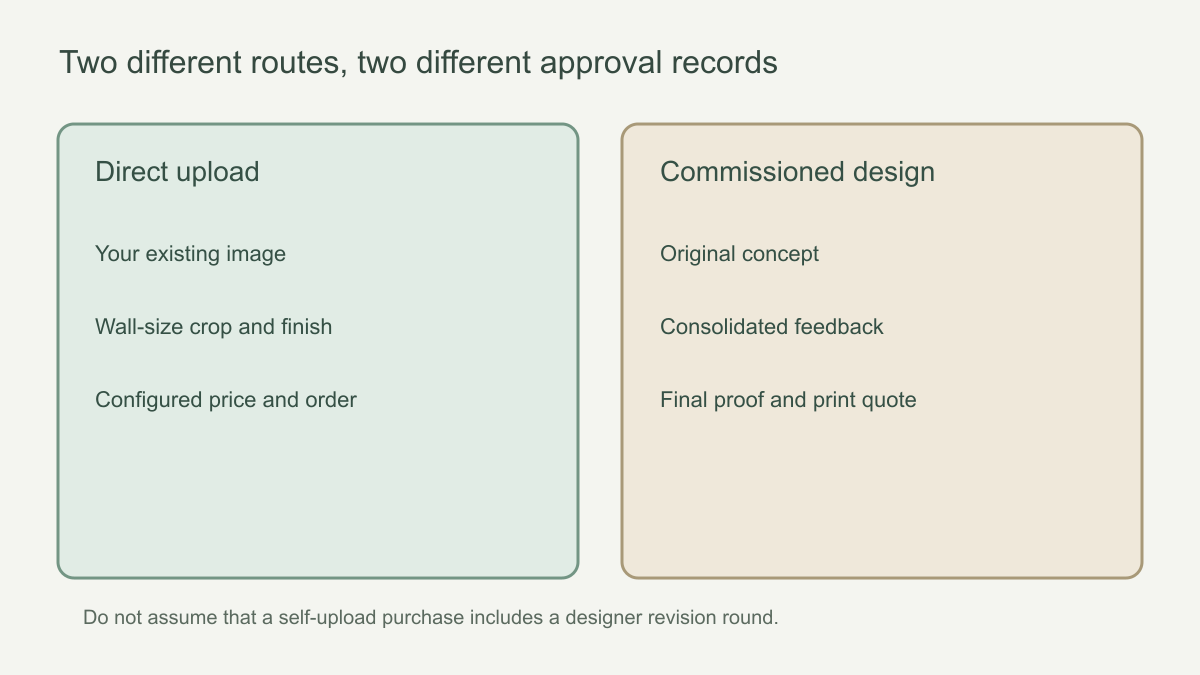 The approval document differs between an existing image and a new commissioned design.
Check the identity and quality of the artwork
For a self-uploaded mural, confirm the file is the intended original, not a compressed preview or earlier edit. Check orientation and important details at a realistic print scale. If the image contains a person, text, map or architectural line, inspect those elements especially closely. Make sure you own the image or have permission to reproduce it. A file that passes an upload size limit is not necessarily sharp enough for a large wall; ask for clarification if the site flags print quality.
For a commissioned design, compare the proof with the written brief. Are the agreed subjects present? Have unwanted elements been removed? Are the background, perspective and key colours what you asked for? A room visualisation is helpful, but the artwork itself should also be reviewed without furniture hiding portions of it. Consolidate corrections into one clear list during the offered revision stage and wait for the revised final proof before approving production.
Make a separate proof pass for irreversible details. Read names, dates and any other lettering character by character, then check whether a mirrored layout reverses the text or changes a recognisable face or landmark. Compare the proof with the original full-resolution file, not a compressed copy passed through a messaging app. Record the approved filename and version: agreeing with the concept is not the same as signing off the exact pixels to be printed.
Sign off the print size shown on the final record
Approval is not the moment to reconstruct the wall survey from memory. Put the dated survey beside the final order or proof and compare the recorded print width, height and units field by field. Solowalls currently asks for about 10 cm (4 in) added once to each overall dimension for trim. The person who measured the wall should confirm that the size being signed off reflects that instruction and any later site changes. For the measuring method itself, use the pre-order checklist.
For example, a 320 × 245 cm wall would ordinarily lead to a 330 × 255 cm print under that allowance rule. If the proof says 330 × 245 cm, do not approve it with a comment asking the printer to “allow extra at the top”. Request a corrected order size and, if its proportions change, a revised crop. Likewise, if a new skim coat or built-in unit changed the finished wall, the earlier measurement record is no longer the approval reference.
On an unusual wall, ask what exactly the proof represents. A rectangular preview may show the full printed bounding area without showing where a slope, return or alcove will remove artwork. Attach the agreed wall elevation to the approval record and identify which person has checked it. A signature on the image alone cannot resolve a dimension or geometry exception that remains outside the file.
Approve the crop, scale and visible focal area
A crop preview shows which part of the source image fits the ordered rectangle. Check all four edges, not only the middle. Mark windows, doors, headboards, radiators and wardrobes that will hide part of the picture. A large flower behind a bed may be acceptable; the only face in a mural disappearing behind a door probably is not. Check whether a horizon, geometric axis or architectural feature sits at a deliberate height in the room.
For a repeating pattern, ask how the scale and repeat will appear across the full width. For a panoramic mural, consider whether a seam crosses a critical detail. If a panel plan is available, compare it with the position of the subject, the doorway and the main view into the room. A digital crop preview is a composition aid, but it cannot assess the actual wall condition or precisely reproduce printed colour. Its boundaries show the chosen image area; they do not prove that every object will remain visible once furniture is back in place.
Keep material, colour and wall readiness as separate approvals
Record the exact finish selected on the final order. If a sample was reviewed, identify which finish it represented; a sample on one material should not silently become approval of another. Note any agreed colour reference in writing, but do not treat an uncalibrated screen preview as a print-colour guarantee. A sample can inform colour and surface expectations, while the full crop or proof establishes image placement and scale. Each answers a different approval question.
Wall readiness belongs to a different person or checkpoint. A printer can approve a file for production without confirming that the customer's plaster, paint or old adhesive is suitable for installation. If an installer has asked for repairs, drying or priming, record that work and its owner separately from the artwork sign-off. Do not write “wall approved” on the design proof unless someone has actually assessed the installation surface under the chosen material's instructions.
A change of finish after the crop was accepted should trigger a fresh check of the order summary and, where relevant, the panel plan. It may change price, handling or the way the image is divided, even if the digital artwork looks identical. The approval record should say which finish is being printed, not merely which samples were discussed.
Close the quotation and production gate
Before the final “proceed”, check that the production quote names the same artwork version, print size and material as the proof. A design-stage fee or an early estimate is not necessarily the price of the finished wallcovering. Confirm the payable total, shipping destination and current production timing on the order record. Review the seller's current change and cancellation terms; do not presume a post-approval edit can be made after printing starts.
Put the final proof or crop screenshot, approved dimensions, selected finish, panel map if supplied, quote and order confirmation in one approval pack. If two attachments share the same filename, give the approved one an unmistakable version identifier and retire the earlier copy. The purpose is not more paperwork for its own sake: the printer should be able to identify one production instruction without guessing which email overruled another.
Make the approval record impossible to confuse
A useful approval message identifies the artwork or upload filename, the proof date or version number, ordered width and height with units, the selected finish, the agreed crop and the quoted total. If the printer has supplied a panel layout, refer to that version as well. For example, “I approve proof V3 dated 12 June for a 330 × 255 cm print in Non-Woven, with the subject positioned to the left of the window” is more actionable than “yes, go ahead”. The date and dimensions here are illustrative; use the values from your own order.
Agree who has authority to approve. On a household project, the person choosing the design and the person measuring the wall may be different. On a commercial project, a designer, facilities contact and purchaser may each review a different part of the specification. Collect their comments before one final sign-off so the printer does not receive conflicting instructions after the file is prepared. A late request to change the crop, finish or dimensions is not a minor text edit; it may require a new proof, a new price or a new production schedule.
Do not approve with an unresolved note such as “make the blue a little softer” or “move the tree if necessary”. Either request the change and wait for a revised file, or state that the current version is approved as shown. If the designer sends a replacement proof, retire the earlier version and repeat the dimension, crop and material check; approval of V2 is not approval of an unseen V3. Ask the seller to confirm any written exception not visible in the image, such as a different print size. This creates one clear reference for the customer, designer and production team.